

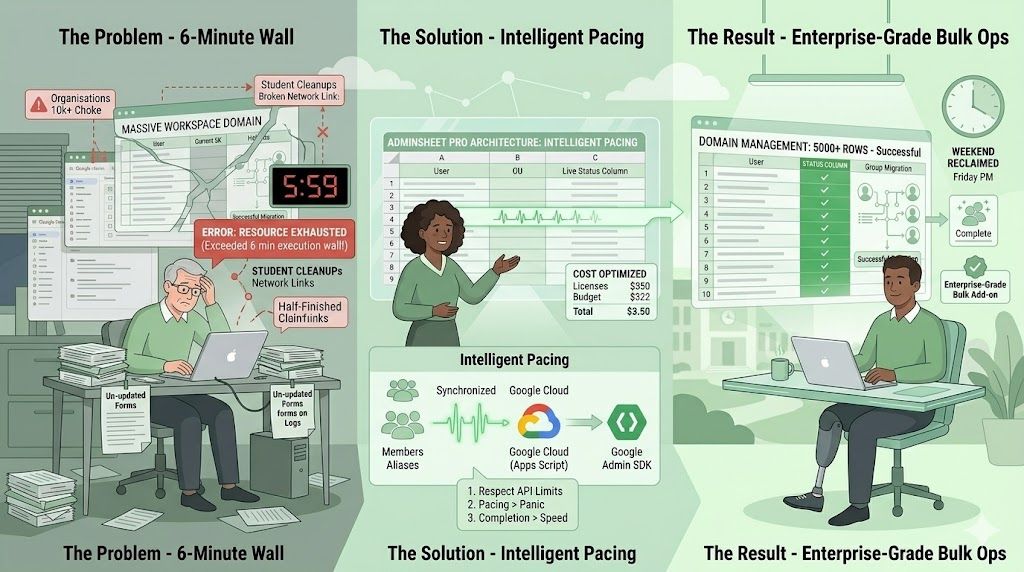


If you have ever tried to manage a massive Google Workspace domain, you know the feeling.
You queue up a bulk operation—maybe updating 5,000 user passwords, migrating a massive nested group, or cleaning up thousands of aliases. You hit “Run,” sit back, and watch the progress bar. And then, right around the 6-minute mark, everything halts.
A red error box pops up: “Exceeded maximum execution time” or “Resource Exhausted.”
Now you are left with a nightmare. Half your users are updated, half aren’t, and you have to manually dig through the logs to figure out exactly which row the script died on so you can restart it.
Welcome to the 6-minute wall.
The Problem with Most Sheet-Based Add-ons
Google Apps Script is an incredible ecosystem, but it has strict limitations to protect its servers. The most infamous is the 6-minute execution limit. If a script runs longer than that, Google violently kills the process.
Historically, almost every sheet-based bulk management tool has slammed headfirst into this wall. Even beloved legacy tools like Ok Goldy suffered from it when deployed on massive enterprise or higher-ed domains.
Recent sheet-based admin tools that, to some extent, do what our Google Workspace add-on does also suffer from this problem. Some of these add-ons have warnings such as: ⚠️ “Organizations with 10,000+ users may experience timeouts due to Apps Script runtime limits.”
One key question we asked ourselves when we set out to develop AdminSheet Pro was: “Why build a ‘bulk’ management tool if it throws its hands up when faced with actual bulk operations?”
The AdminSheet Pro Approach: Intelligent Pacing
So when my team at HWS Technologies built AdminSheet Pro, we knew that simply throwing API calls at Google’s servers as fast as possible was a recipe for disaster. We decided early on that we weren’t going to fight with this 6-minute wall, but we would find a way to gracefully handle it.
While our competitors are printing warning labels, we built an architecture we call Intelligent Pacing. Using this, AdminSheet Pro anticipates the execution wall and seamlessly manages the continuation of your tasks entirely in the background, making it possible for a user to run tasks with thousands of rows.
Through building this, we learned a few hard truths about what it takes to build a truly enterprise-grade Workspace add-on:
1. Respect the API limits: You cannot brute-force Google. You have to honour their rate limits, or your users pay the price.
2. Pacing over Panic: By using Intelligent Pacing, the tool maintains a sustainable rhythm that guarantees delivery, rather than sprinting to an inevitable crash.
3. Completion > Raw Speed: When designing a bulk tool, you have to make a choice between reckless speed and guaranteed task completion. We chose the latter. It is better for a script to take an extra few minutes to run safely than to crash halfway through.
4. Visual Feedback is Non-Negotiable: Admins suffer from “terminal anxiety.” If a script is running for 10 minutes in the background with no updates, the instinct is to kill it. You must provide real-time, row-by-row visual feedback so the admin knows exactly what is happening at all times.
The Result
When faced with operations in the thousands, standard sheet-based add-ons choke, time out, and leave you with a mess. AdminSheet Pro handles it with grace.
If you are tired of babysitting your bulk updates and praying they finish before the 6-minute timer runs out, it’s time to upgrade your toolkit.
Check out AdminSheet Pro on the Google Workspace Marketplace today. (And make sure it says “Pro” at the end! …and the Pro stands for “Professional” – yes, our tool is built by some of the best professionals in the business.) 😉